
An online order should move your business forward. But if your team has to reenter that order into a supplier portal, track down confirmations, and manually copy shipping information, every sale creates more administrative work.
Connecting EDI documents to your eCommerce platform helps turn an online purchase into a coordinated order workflow. Purchase orders, supplier responses, shipping notices, and invoices can move between connected systems with less manual handling.
For distributors and B2B sellers, that connection can make a meaningful difference in daily operations. Here’s how EDI documents work, why they belong in your eCommerce workflow, and what to look for in an integration.
What Are EDI Documents?
EDI documents are structured electronic business records exchanged between trading partners’ computer systems. EDI stands for electronic data interchange.
Unlike an emailed PDF, an EDI document contains data organized for software to interpret. With the right integration, the receiving system can process that information without someone typing it in again.
As EDI Basics explains, trading partners agree on document standards and versions, while translation software converts the information into formats their business applications can use.
That distinction matters: sending information electronically is only part of the process. The receiving system also needs to understand and apply it.
Want a video resource to explain more? We found this EDI document overview to be helpful.
Common EDI Documents Used in eCommerce
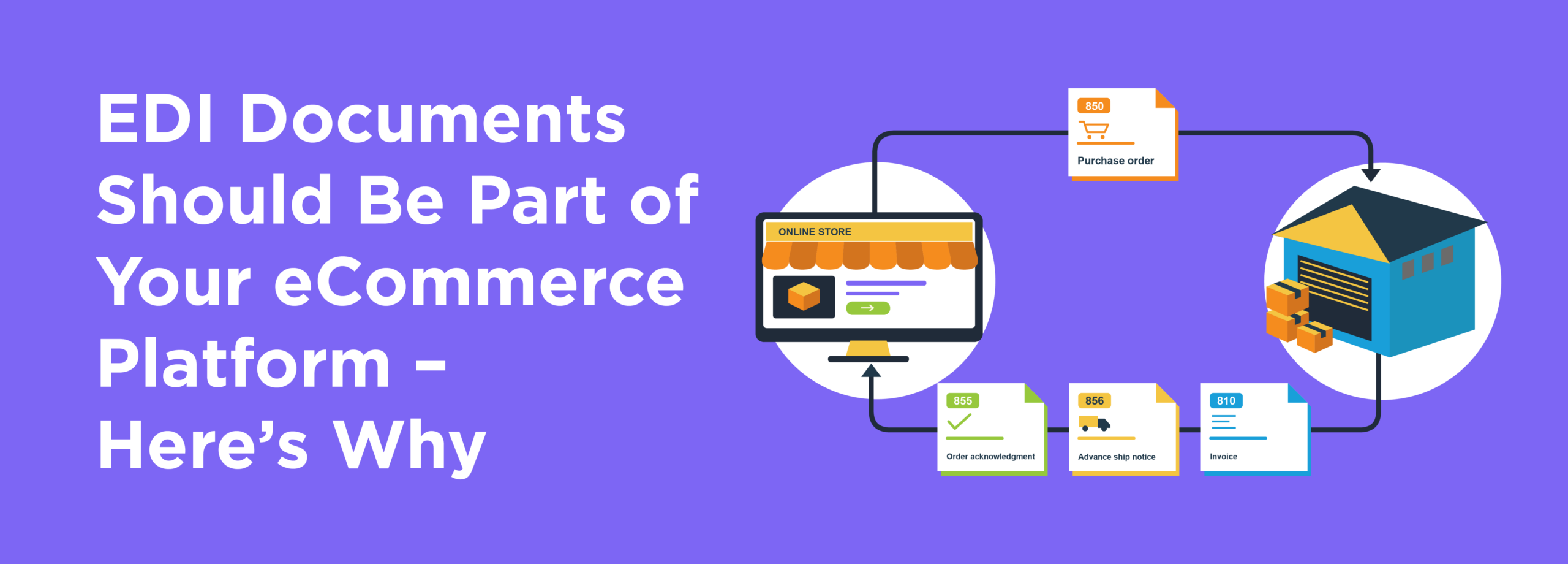
Different EDI documents support different steps in a transaction. Common ANSI X12 document types include:
EDI document | Purpose |
|---|---|
| 850: Purchase Order | Communicates an order for products or services. |
| 855: Purchase Order Acknowledgment | Communicates the supplier’s response to a purchase order. |
| 856: Advance Ship Notice | Provides information about an upcoming shipment. |
| 810: Invoice | Communicates billing information. |
| 997: Functional Acknowledgment | Reports the results of syntactical analysis of received transaction sets. |
Logicblock lists these document types among its direct EDI capabilities. The documents required for an individual connection depend on the trading partner and workflow.
A functional acknowledgment should not be confused with order acceptance. Successfully receiving an EDI document does not necessarily mean a supplier has agreed to fulfill the order.
Why Integrate EDI Documents With Your eCommerce Platform?
Your storefront captures what customers want to buy. EDI integration helps connect that purchase with the supplier and business processes needed to fulfill it.
When EDI documents remain disconnected from order management, employees may still have to bridge the gaps. Integrating them gives your platform a way to use the information behind each transaction.
Reduce Repetitive Data Entry
Consider a distributor that receives an online order and purchases the products from a supplier.
Without integration, an employee may need to recreate the purchase order, enter product numbers and quantities, and copy the delivery address. Each additional entry creates another opportunity for a mistake.
An integrated workflow can generate outbound EDI documents from existing order information. Employees can then focus on exceptions, such as an unrecognized product number or an address that needs review.
Improve Order Visibility
Sending a purchase order is one step. Your team also needs to know what happens afterward. Connecting incoming EDI documents to the relevant order can help employees identify supplier responses and shipment information without searching through separate systems.
This is particularly useful when an order involves multiple suppliers or shipments. The integration should preserve those relationships so employees can distinguish what has shipped from what still needs attention.
Support More Useful Customer Updates
Customers need accurate answers about their orders. When shipping information reaches your order management workflow automatically, your team has less information to retrieve and enter manually.
For example, Logicblock’s supplier integrations can apply supplier tracking numbers to orders and email shipping confirmations to customers.
The benefit depends on the information your supplier provides and how the connection is configured. EDI documents support timely updates, but they do not make every exchange instantaneous.
Make Growing Order Volume Easier to Manage
If every order requires several manual steps, additional sales can quickly increase administrative demands.
Automating routine exchanges of EDI documents can reduce the handling required per order. That gives your team more capacity to assist customers, resolve purchasing issues, and manage exceptions.
Evaluate the result through practical measures: time spent entering orders, correction rates, and how quickly employees can resolve missing information.
How an Integrated EDI Workflow Works Step-By-Step
Imagine a customer ordering office supplies from your website for delivery directly from a supplier.
A configured workflow might follow these steps:
- The customer places an order. Your platform captures the products, quantities, and delivery details.
- A purchase order goes to the supplier. The integration translates the purchasing information into the agreed EDI format.
- The supplier responds. Incoming EDI documents communicate the supplier’s acknowledgment and relevant order details.
- Shipment information returns. A shipping notice provides information that can update the associated order.
- Invoice information enters the connected workflow. The supplier’s invoice becomes available for the appropriate review or accounting process.
Each step requires agreed rules. Product identifiers, units of measure, delivery details, and document references must map correctly between systems.
Your eCommerce platform can coordinate these activities through built-in capabilities or a managed integration. The important requirement is that EDI documents connect to the work your team needs to perform.
What to Look for When Managing EDI Documents
Before selecting an integration, ask the provider to demonstrate a complete transaction, including what happens when something goes wrong.
Focus on these requirements:
- Trading partner support: Which suppliers and customers are already connected?
- Document coverage: Which EDI documents can the integration send and receive?
- Mapping and testing: Who configures partner requirements and validates the connection?
- Exception handling: How are rejected documents, missing responses, and duplicate transmissions identified?
- System ownership: Which application controls order, inventory, and accounting records?
- Ongoing support: Who maintains the connection when a partner changes its requirements?
Document transmission alone does not complete the workflow. Your team needs visibility into failures and a clear process for correcting them.
Connect Your EDI Documents With Logicblock
Logicblock offers a managed EDI integration service that supports sending supplier orders, receiving customer orders, and connecting business systems. Its published capabilities include purchase orders, acknowledgments, advance ship notices, and invoices.
Logicblock also offers new trading partner connections when an existing integration is unavailable. Discuss your required EDI documents, transaction direction, and partner specifications with the team to establish the scope.
Explore Logicblock’s EDI integrations to connect your online orders with the document workflows behind fulfillment.
FAQs About EDI Documents
What are EDI documents used for?
EDI documents exchange structured business information between trading partners. Common uses include placing purchase orders, communicating supplier responses, providing shipment details, and sending invoices.
Is an emailed PDF an EDI document?
An emailed PDF is generally intended for someone to read. EDI documents follow agreed structures that connected systems can interpret and process automatically.
Which EDI documents does an eCommerce business need?
Your requirements depend on your trading partners and processes. Purchase orders, order acknowledgments, advance ship notices, and invoices are common starting points. Confirm the required formats and versions with each partner.
Can EDI documents eliminate all order errors?
No. EDI integration can reduce errors caused by repetitive data entry, but incorrect source data and mapping problems still require attention. Validation, testing, and exception handling remain essential.
Does my eCommerce platform need to replace my ERP to handle EDI documents?
No. Your platform can exchange information with an ERP or other business systems through an integration. Define which system owns each record and how updates move between applications.
Can Logicblock manage EDI documents for my business?
Logicblock provides managed EDI services for supplier ordering, incoming customer orders, and business system connections. Its team can review your trading partners and required EDI documents to determine the appropriate setup.
